


Spades by Pokerist
4.51.49K Reviews
App Specs
- Version
- 71.49.0
- Updated On
- License
- Free
- Downloads
- 500,000+
- Developer
- KamaGames
- Categories
- Card
- Platform
- Android
Screenshots



 Analysis by AppCompare
I tend to enjoy card games most when the rules are familiar but the table still feels lively. Spades by Pokerist is built around that balance: it brings the partnership-and-trick-taking appeal of Spades into a 3D multiplayer setting. In my experience, the visual presentation is part of the draw, but the real reason to stay is the chance to play against other people rather than treating every hand as a quiet puzzle.
Why the multiplayer table matters
Spades is a game where the decisions make more sense when you can read a changing table, not just memorize rules. Playing with other people gives each hand a social rhythm: you make a choice, see how the trick develops, and adjust your expectations for what your partner or opponents might hold. That makes this a better fit for someone who already likes card-table interaction than for someone looking only for a solitary logic challenge.
The game is free to download, and KamaGames is the developer. It has a 4.5 average from around 14,000 ratings, with more than 500,000 installs. Those figures suggest that it has found an audience, but they do not tell you whether its pace or social style will suit you; I would judge that by whether you enjoy multiplayer card play in the first place.
How a session feels in practice
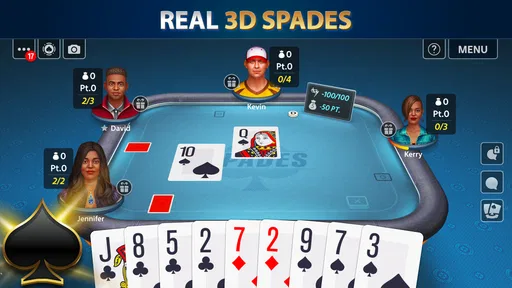
The 3D presentation gives the table a sense of place without making the cards hard to follow. I like that the graphics are clean rather than crowded: the focus stays on the hand and the choices around it. The animations add a little polish, although players who prefer a plain, fast interface may find a more traditional two-dimensional card app easier to scan.
When I have a few spare minutes, a quick hand is an easy way to fit a little Spades into the day. For a longer session, the multiplayer element gives me a reason to pay attention to the flow between tricks instead of tapping through a sequence without much thought. If you are new to the game, the tutorial is a useful starting point; if you already know the rules, you can use it as a short refresher and move on to playing.
One practical tip is to treat early matches as practice in reading the table, not as a test of whether you are immediately good at the game. Pay attention to which suits have been played and how your partner’s choices affect the hand. That small habit makes each round more interesting and helps you learn from decisions rather than relying on luck alone.
Where it fits among card games
Compared with a basic digital deck or a single-player card game, this version puts more emphasis on the shared table and the look of the match. That can make it more engaging when you want human opponents and a visual setting. On the other hand, if you want an offline pastime, a no-chat environment, or a stripped-down game that starts and ends as quickly as possible, a simpler card app may be a better choice.
Worth Reading Before You Choose

EA SPORTS FC Mobile 26 Is a Bigger Football Game, but It Takes Time

Flipboard Shows What News Apps Must Do Beyond the Feed

Switching to Android Auto Means Rethinking Your Driving Routine

Google Calendar Makes a Crowded Week Easier to Manage

Ludo King Makes the Most of the Minutes Between Plans

Baby Panda World Brings Quick Play to Modern Phones, but Its Game Library Feels Busy
The multiplayer format also means the experience depends partly on the people at the table. Some sessions will feel lively; others may be less engaging if players do not interact much. I would pick it when I am in the mood for a social game, rather than expecting every match to feel like a close-knit group of friends playing together.
Who is likely to enjoy it?
I would recommend it to people who know Spades, enjoy learning through play, and like the extra energy of competing with other players. It can also suit someone who wants to introduce themselves to the game, provided they are comfortable taking a little time to understand the decisions behind each trick. The age rating is Teen, so it is worth checking that fit before handing the device to a younger player.
If you prefer predictable solo play, dislike online interaction, or want every feature available without considering optional spending, this may not be your ideal pick. The game is free, but it includes in-app purchases priced from $0.99 to $999.99 per item. I would approach those as optional and decide in advance whether spending belongs in your play habits; the purchase range makes that a more useful boundary than simply tapping through prompts.
Jumping Into the Game
First things first, downloading Spades by Pokerist is a breeze. It’s available on both Android and iOS, so no one's left out. Once you get it installed, the app welcomes you with a sleek, user-friendly interface that makes navigation a cinch. The developers have clearly put in some effort here, making sure everything is just a tap away.
As soon as you launch the app, you're greeted with a tutorial. It's super helpful, especially if you're new to Spades. The tutorial is interactive, guiding you step-by-step through the basics. Even if you’re a seasoned pro, it’s a nice refresher.
Game Modes Galore
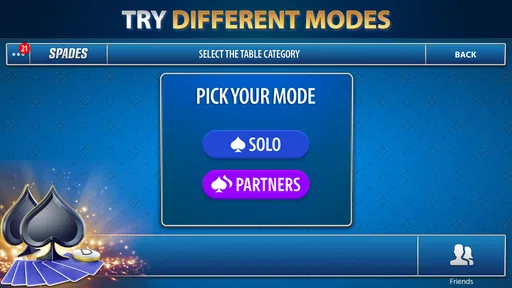
One of the standout features is the variety of game modes available. Whether you're in the mood for solo play or want to challenge your friends, this app has got you covered. There’s a single-player mode where you can practice against AI opponents, and let me tell you, they’re no pushovers.
Then there’s the multiplayer mode. You can join tables with random players or invite your friends for a match. The app supports both real-time and turn-based multiplayer games, so you can play at your own pace. Pretty neat, right?
For a practical routine, I would use solo games to rehearse the basics and save multiplayer for when I want to test those habits against people. In a real everyday scenario, that might mean a short practice while waiting for a ride, followed by a friend match later when both players have time to focus. The turn-based option suits a less hurried moment, while real-time play is the more natural choice when everyone is ready to concentrate together.
Aesthetics and Audio
The graphics in Spades by Pokerist are clean and vibrant. It’s not overly flashy, but it’s got enough flair to keep things visually interesting. The card animations are smooth, and the table designs are customizable, allowing you to add a personal touch to your games.
Now, let’s talk about the sound. The background music and sound effects are subtle but effective. They add to the ambiance without being distracting. If you prefer playing in silence or with your own tunes, there’s always the option to mute them. It’s the little things that count, right?
One trade-off with a polished table is that it can feel busier than a bare-bones card layout, especially if your priority is checking cards at a glance. I would take a moment to settle on a table design that feels readable to me, then leave it alone rather than treating customization as another task to keep revisiting. Muting the audio is also a simple way to make a quick session fit a quiet public place without giving up the visual cues of the match.
In-App Purchases and Ads
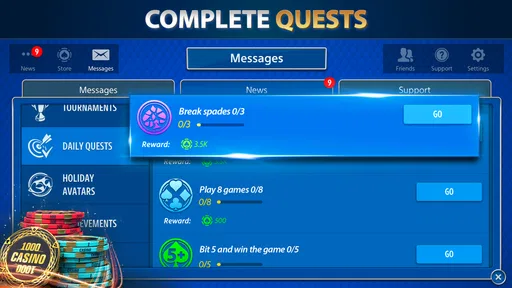
Like most free apps, Spades by Pokerist does have in-app purchases. You can buy chips and other goodies, but the best part is, you can still enjoy the game without spending a dime. The app is pretty generous with its daily bonuses, so you’ll always have some chips to play with.
When it comes to ads, they’re there, but not intrusive. You can watch ads to earn extra chips, but they won’t pop up in the middle of a game to ruin your flow. It’s a fair trade-off for a free game, in my opinion.
The useful distinction is between spending to keep a session going and spending because a particular hand has gone badly. I would avoid making a purchase in the heat of a match; a daily bonus or an optional ad is a more measured way to continue if I still want to play. If you are choosing this mainly as a free pastime, set that expectation before opening the purchase screen and treat any paid extras as a choice, not a requirement.
Community and Support
The community features are another strong point. There’s an in-game chat for those who like to socialize while playing. It’s a nice way to connect with other players, share tips, or even a little friendly banter.
If you ever run into issues, the support team is just a message away. They’re pretty responsive, so you won’t be left hanging if something goes awry.
Chat is best treated as an optional layer, not the reason to choose the game. I would use it when the table feels friendly and ignore it when I only want to concentrate on the cards. That flexibility matters for people who like multiplayer competition but do not want to turn every hand into a conversation. If uninterrupted play is your priority, a solo card game remains the simpler alternative.
The game runs on Android 6.0 or later, and its current version is 71.49.0. That gives Android users a straightforward compatibility check before installing. Its Teen rating is another useful consideration for shared devices, while the free entry point makes it easy to try before deciding whether the multiplayer pace and presentation are a good match.
Overall, Spades by Pokerist is a solid choice for both casual and competitive players. It’s got all the elements of a great card game app: smooth gameplay, a variety of modes, and a welcoming community. Whether you’re playing solo or with friends, it’s sure to keep you entertained. Happy card playing!
Pros
- Intuitive interface for easy navigation.
- Engaging multiplayer experience.
- Regular updates with new features.
- Customizable avatars and themes.
- Smooth gameplay with minimal lag.
Cons
- Ads can be intrusive at times.
- In-app purchases are pricey.
- Limited offline play options.
- Occasional connectivity issues.
- Tutorials could be more detailed.
FAQs for Spades by Pokerist
What platforms is Spades by Pokerist available on?
Spades by Pokerist is available on both Android and iOS platforms. You can download it from the Google Play Store for Android devices or the Apple App Store for iOS devices. Ensure your device meets the app's minimum operating system requirements for a smooth experience.
Is Spades by Pokerist free to play?
Yes, Spades by Pokerist is free to download and play. However, it offers in-app purchases for various items and features that can enhance your gameplay. While these purchases are optional, they can provide advantages or additional entertainment value within the game.
Does Spades by Pokerist require an internet connection?
Yes, Spades by Pokerist requires an active internet connection to play. This is because the game features online multiplayer modes where you can compete against players from around the world. Ensure you have a stable internet connection to avoid disruptions during gameplay.
Can I play Spades by Pokerist with friends?
Absolutely! Spades by Pokerist allows you to connect with friends and play together. You can invite friends to join your table or join existing games together. This feature makes it easy to enjoy the classic card game with your friends, no matter where they are.
How does Spades by Pokerist handle in-game ads?
Spades by Pokerist does include in-game ads, but they are generally unobtrusive. The ads help support the free-to-play model. If you find them disruptive, you may have the option to remove ads through an in-app purchase, enhancing your overall gaming experience.


